Learn piano chords & scales with an app
Like Duolingo for chords, scales and music theory.
Drill any chord, scale, key or inversion in your browser — with instant feedback from your MIDI keyboard. Free, and no account needed.

Dashboard Already have an account? Log in
Over 70 sextillion piano exercises in one place
How is that possible? Learn more
Which part is holding you back?
-
Chords & inversions feel intimidating?
Recognize and play any chord — major, minor, sevenths and beyond — in every inversion, until it's automatic.
-
Scales & key signatures won't stick?
Drill the diatonic chords and scales of all 12 keys, so you instantly know what you're seeing and where your hands go.
-
Reading note by note?
Turn on staff mode and learn to read whole chord shapes and patterns in the key.
-
Can't tell chords by ear?
Ear-training drills build the pitch and chord recognition that lessons rarely have time for.
-
Practice fizzles out?
Daily streaks, levels, hearts and (yes) LOL-cat rewards keep you coming back.
Try these exercises
Drills you can start with one click
Piano practice
C major scale, single notes
A harmonic minor, one hand, with fingerings
G major scale, 1st inversions
Minor scales, root position, all keys in circle-of-fifths order
2-5-1 major progression, all keys, ×3 each
C, D, E chords — minor & major, root position
C, D, E chords — minor & major, all inversions
Diatonic triads of C major, root position, up & down
Everything in one app
Practice

Instant MIDI feedback
Plug a MIDI keyboard into Chrome and every note is graded the moment you play it.

Works without a keyboard
Practice on a phone or tablet with tap-to-answer flash cards — no MIDI required.

Ear training
Recognize pitches and chords by sound.

What's the chord?
Name the chord you see or hear, on any device.

Jumper rhythm game
A runner jumps each obstacle when you play the chord on the beat.
Stay motivated

Levels & hearts
Master each chord type, collect hearts and climb the levels.

LOL-cat rewards
Silly cat pictures when you hit your goals.

Daily streaks
Practice every day and the counter goes up; skip a day and it starts over.

Practice reminders
A friendly nudge on your phone around the time you usually play, so a good run keeps going.
Make it yours

Works on your phone
Add it to your home screen and practice anywhere — full screen, no app store.

Theory, organized
Scales drawn on the keyboard, the chords built on each degree, and tours round the circle of fifths.

Beginner to pro
Tune chord types, notation, hands, tempo and more to your level.

Ready-made & custom sets
Pick a set or build your own exercise list.
See the app in screenshots
Click any screenshot for full-screen detail
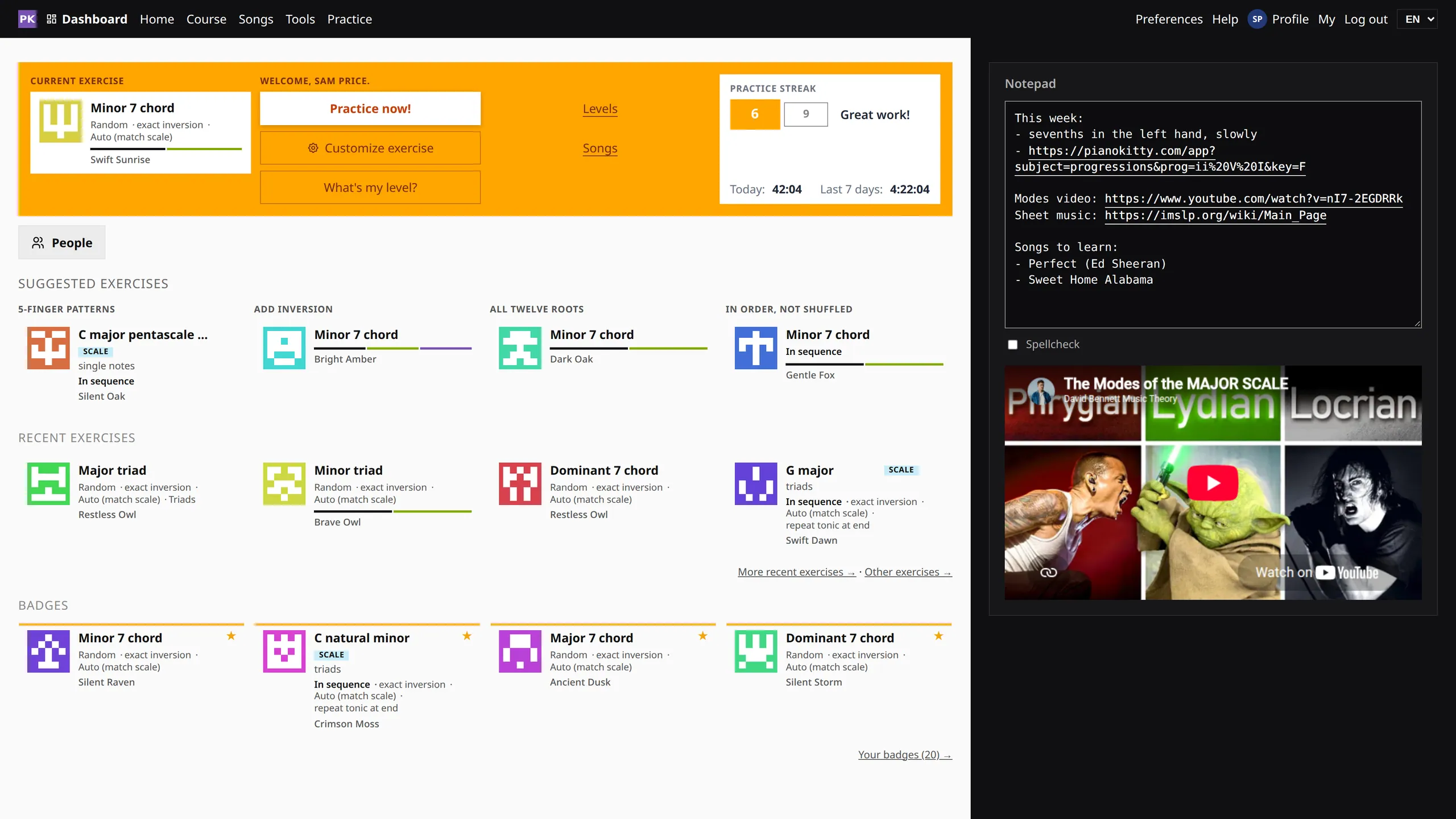
Pick up where you stopped. Your current exercise, streak, next suggestions and badges are on one page, next to a notepad for links and videos.
More about this featureHow it works
-
Connect
Plug a MIDI keyboard into Chrome, Edge, Opera or Brave. No keyboard? Naming and ear training work without one.
-
Choose
Pick the chord types, scale and key you want to drill in Preferences.
-
Play
Play the prompt, get instant right/wrong feedback, and keep your streak alive.
Practice with friends
Add the people you play with and see each other's week: minutes, streaks and coins. Only people you connect with appear — there is no public leaderboard.
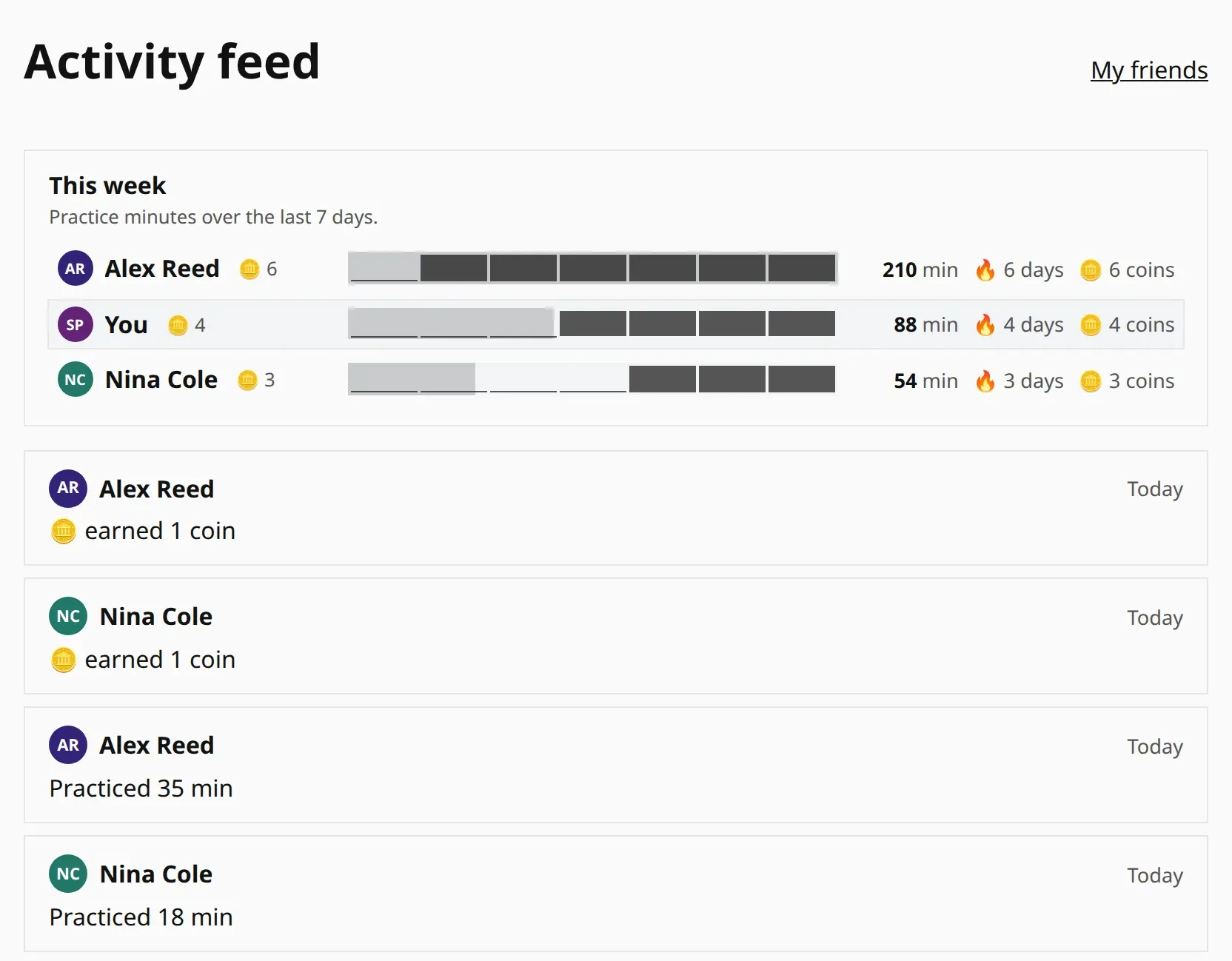
Activity feed
See what your friends practiced today, and let them see your week too.
Send an exercise
Share a drill with its settings and a note with a friend, a student or your child.
Practice anywhere, on your phone
Add PianoKitty to your home screen and it behaves like any other app — its own icon, full screen, one tap. There is nothing to download from the App Store or Google Play.
- Install straight from the browser on Android and iPhone, with no store and no download.
- Play on the touch keyboard when your MIDI piano is not around — a bus ride is enough for a few minutes of drilling.
- Practice reminders arrive on your phone, and your streak follows you between devices.
Tailored to you
Choose chord types, notation, hand, tempo and more for every drill.
Open preferencesFind your level
Not sure where to start? Take a 2-minute adaptive test and get a suggested exercise.
Start the testLearn chords for popular songs
Hundreds of thousands of songs to choose from — find one and practice its chords.
Or jump straight into a popular one:
For piano teachers
Assign exercises as homework and see what your students actually practice between lessons.
- Assign any chord, scale or custom set as homework.
- Track practice between lessons: weekly minutes, streaks, and every practice session.
- Students sign in under their own name and keep their progress.
Totally new to piano?
No piano or MIDI keyboard? We have plenty of exercises you can practice without either. Start with these:
Practice without a piano
Learn notes on the staff
Learn the notes of all major scales
Recognize major & minor chords by ear
Practice on the on-screen keyboard
Learn note names
Learn notes on the staff
All for free
You can use everything without signing up or giving an email address, and there is no tracking. An account is optional and adds cross-device sync, streaks, favorites and teacher tools.