Transpose a song
Move a whole chord chart up or down by a half step, a whole step or a fifth, from the keyboard or with a button. The chord names stay readable.
The song is in the wrong key
The chart you found may sit too high for the singer, or a guitarist may have played it with a capo and written down the shapes rather than the chords that sound. Your band may play it a tone lower than the recording, or your teacher may ask you to play it in another key.
In the Songs subject you can move the chords you are practicing as a whole, and the drill carries on in the new key.
Two key presses up
With a song on the practice screen, W moves it up a half step and Q down, while S and A move it by a fifth. The chart above the chord changes straight away, and a message shows the new chord line so you can check it.


| W | Up a half step |
| Q | Down a half step |
| S | Up a fifth |
| A | Down a fifth |
Or with the buttons
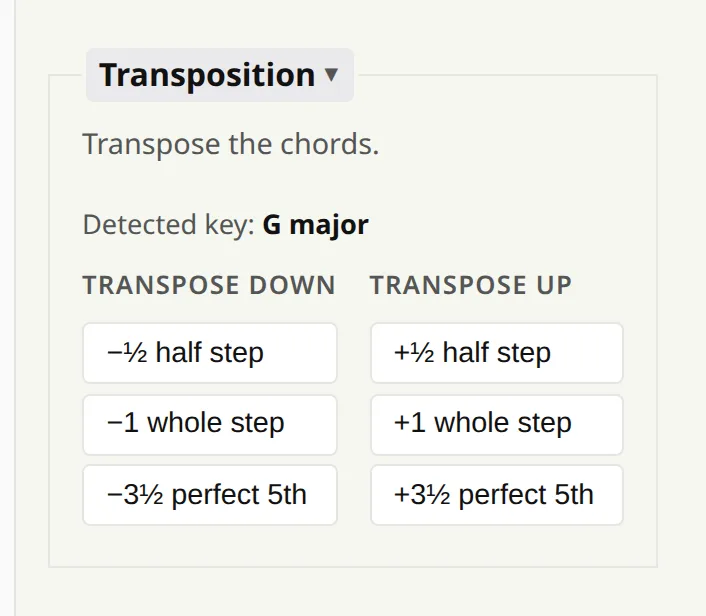
The same moves are in Preferences, under Songs → Transposition: a half step, a whole step or a fifth, up or down. Above the buttons the app shows the key it detects in the song, which helps you decide where to move it.
Spelled the way a musician would
The app picks sensible letter names when it transposes: E up a half step is F rather than E♯, and E♭ down a half step is D. If you want the strict interval, hold Shift while clicking a half-step button.
- Slash chords move with their bass: C/E becomes D/F♯.
- Bar lines, section names and anything else that is not a chord stay as they are.
Progressions and scales are written as degrees rather than chord names, so there the same keys change the key of the exercise. See play it in any key.