The notepad
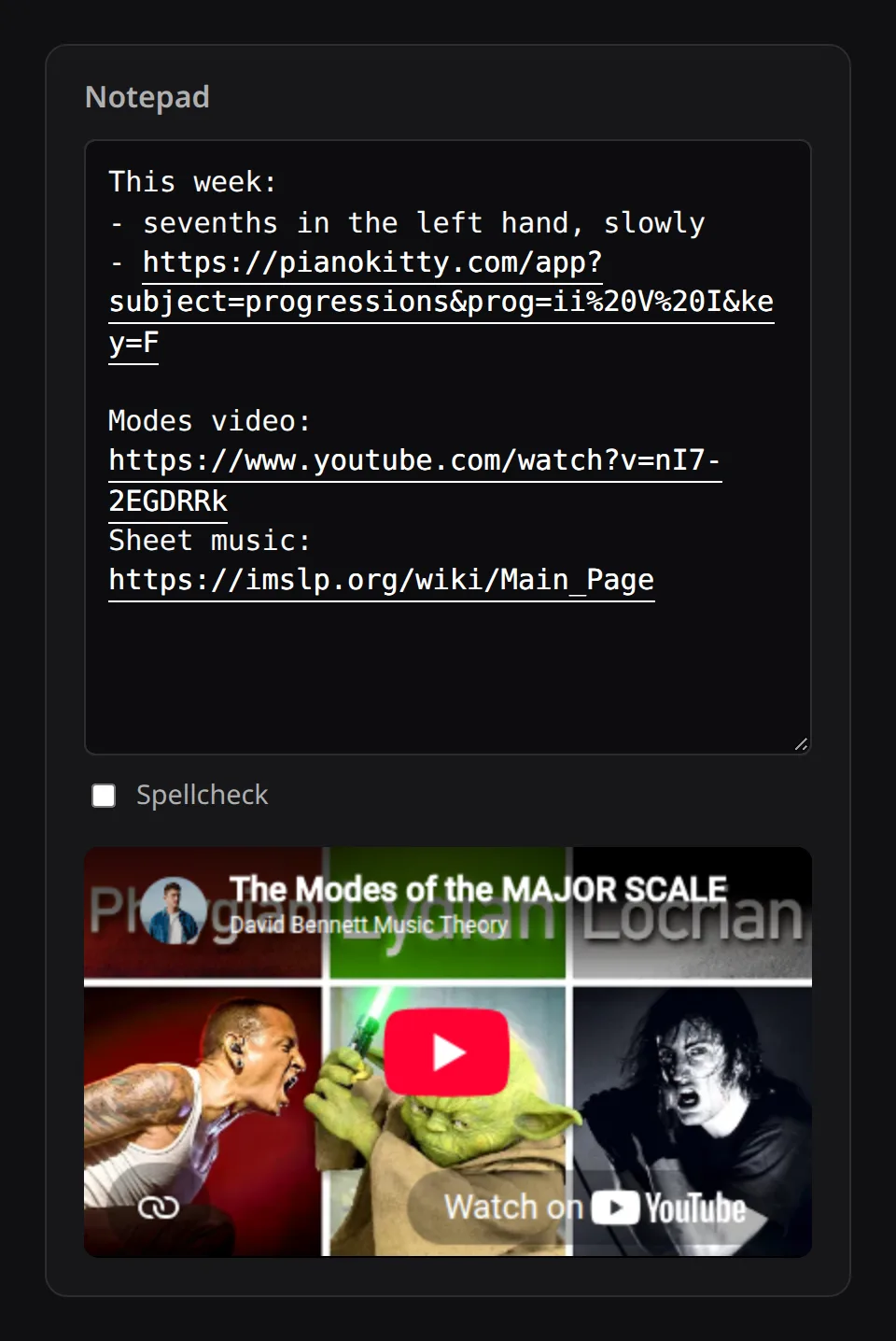
A plain text box on your dashboard. Web addresses in it become clickable links, YouTube links get a player, and exercise links open the exercise.
Notes with working links
The notepad is for things like what the teacher said, the video to watch again, or the chords of the next song. It is on the dashboard, on the same screen as the practice button.
It holds plain text, and it handles links:
- a web address becomes a clickable link;
- a YouTube link gets a player underneath the notes, so the lesson video plays right there;
- a PianoKitty exercise link opens that exercise.
What to keep in it
- Write down what the teacher asked for while you still remember it.
- Paste the tutorials you want to work through; they play inside the notepad.
- Paste a song’s chords here, then copy them into the chord editor when you are ready to drill them.
- Keep links to the drills you do every day, so you can open them without going through the menus.
- Keep a practice diary, one line a day about what felt hard.
When you are signed in, the notepad syncs, so you can write on the laptop and read it on the phone by the piano.
Adding pages from other websites
You can also add a page without typing. The Send to PianoKitty bookmarklet puts the title and address of the page you are on at the top of the notepad in one click.